Built around what actually goes wrong
Every scavenger hunt fails in the same handful of ways. Seekt was built around them.
“I’m not a writer. How am I going to come up with ten clever clues?”
You don’t have to. Seekt ships with over 200 ready-to-use items inside the app, spanning kids’ parties, corporate events, school trips, family reunions, indoor rainy-day games, and quirky outdoor challenges. Filter by audience and style to find what fits your event, swap in your own photos or locations, and you have a finished hunt. Save your favourites as templates and reuse them next year.
Hunt Library · reusable templates · item duplication
“My friends followed directions terribly and got all mixed up.”
Paper clues fail the moment one team takes a wrong turn. Seekt shows you every team on a live map, lets you broadcast a correction to anyone who’s drifted, and reroutes them with a directional arrow. If a team gets stuck on an item, you can drop them a hint mid-game without stopping anyone else.
Live Leaderboard & Map · Live Announcements · hints with optional point costs
“We’re mixing seven-year-olds with teens and a few adults. One clue list won’t work for everyone.”
Each team can see items in a different order, so groups stay spread out instead of clustering at the same clue. Items can be GPS-locked to specific spots, so harder challenges live where you place them. And you review every submission yourself before awarding points — the difficulty bar is yours to set.
Randomised Order · Location Triggers · Evidence Review
“I’m worried about the kids wandering off.”
Draw a play area on the map. If anyone steps outside it, you and the team get a live alert. Configurable safety check-ins prompt teams to confirm they’re OK at intervals you set, and the host dashboard flags anyone who’s overdue. When the hunt ends, a directional arrow guides everyone back to home base.
Game Zone · Safety Check-ins · Home Base Return
“The other apps charge a subscription. I run two parties a year.”
Seekt is a one-time purchase. Host plans start at US$29.99 and don’t renew. Players never pay. No ads, ever. If you only run one event, the Family plan covers up to ten player devices and you keep it forever.
One-time pricing · free player joining
“What if the WiFi at the park is terrible?”
Submissions queue offline and sync when reception returns. The hunt keeps running. Players keep playing. You don’t have to scout cell coverage when you pick a venue.
Offline Mode
How do I host a scavenger hunt with Seekt?
Create a hunt in the app, add items from the built-in library or your own ideas, and adjust point values. Share the QR code or join code with players. They scan, pick a team, and start playing the moment you tap Start. Players join free; hosts pay once.
For the Host
1
Create a hunt and add items — as simple as a list of things to find
2
Share the QR code or PDF with players
3
Start the game and watch teams compete
For Players (Always Free)
1
Scan the QR code or enter the join code
2
Find items, take photos, answer questions, and submit
3
Check the leaderboard and race to the finish
A hunt can be as simple as a list of items and a timer. Everything else is optional — add as much or as little as you like.
What kinds of items can I create?
Items range from photo and video evidence to text answers, multiple choice quizzes, photo matching, multi-part submissions, and physical collect challenges. Any item can be locked behind a GPS location with a directional arrow that guides players to the spot.
Photo & Video Evidence
Submit photos or 10-second video clips as proof. GPS recorded with each submission.
Text & Numeric Answers
Typed answers with auto-scoring for exact matches or host review for free text.
Multiple Choice
Quiz players with multiple choice questions. Auto-scored against the correct answer.
Photo Matching
Upload a reference photo as the clue. Players find and photograph the match.
Multi-Part Items
Require multiple photos for one item. Progress shown as "2 of 3 submitted."
Collect Objects
Items that must be physically collected and brought back, not just photographed.
Location Triggers
Lock any item behind a GPS location. A directional arrow guides players there. The item unlocks when they arrive.
How does scoring work?
Each item has a point value. Optional layers add depth: first-finder bonuses reward speed, streak bonuses reward consistency, time-decay scoring penalises latecomers, and hint costs let you charge points to unlock help. Hosts can adjust scores when reviewing submissions.
Hints with Point Costs
Text hints or location arrows. Optionally charge points to create a strategic choice.
Time-Decay Scoring
Items lose value over time, rewarding speed. Set a decay rate and minimum floor. Players see exactly how many points were deducted.
Scoring Bonuses
Reward the first finder and hot streaks with bonus points.
Competitive Exclusivity
First team to claim an exclusive item locks out all others.
What makes a Seekt game competitive?
Multi-member teams play from separate phones with a captain who approves joins. Randomised item order keeps groups apart. A drawn game zone alerts players who leave the play area. Hidden items unlock from triggers, and exclusive items reward the first team to claim them.
Multi-Member Teams
Multiple players join the same team from their own phones. A team lead approves join requests and can transfer leadership. Each member submits independently.
Game Zone
Draw a play area on the map. Out-of-zone submissions are flagged, and players get a live alert when they leave or re-enter the zone.
Expiration Windows
Items available only during a time window. Creates urgency.
Hidden & Bonus Items
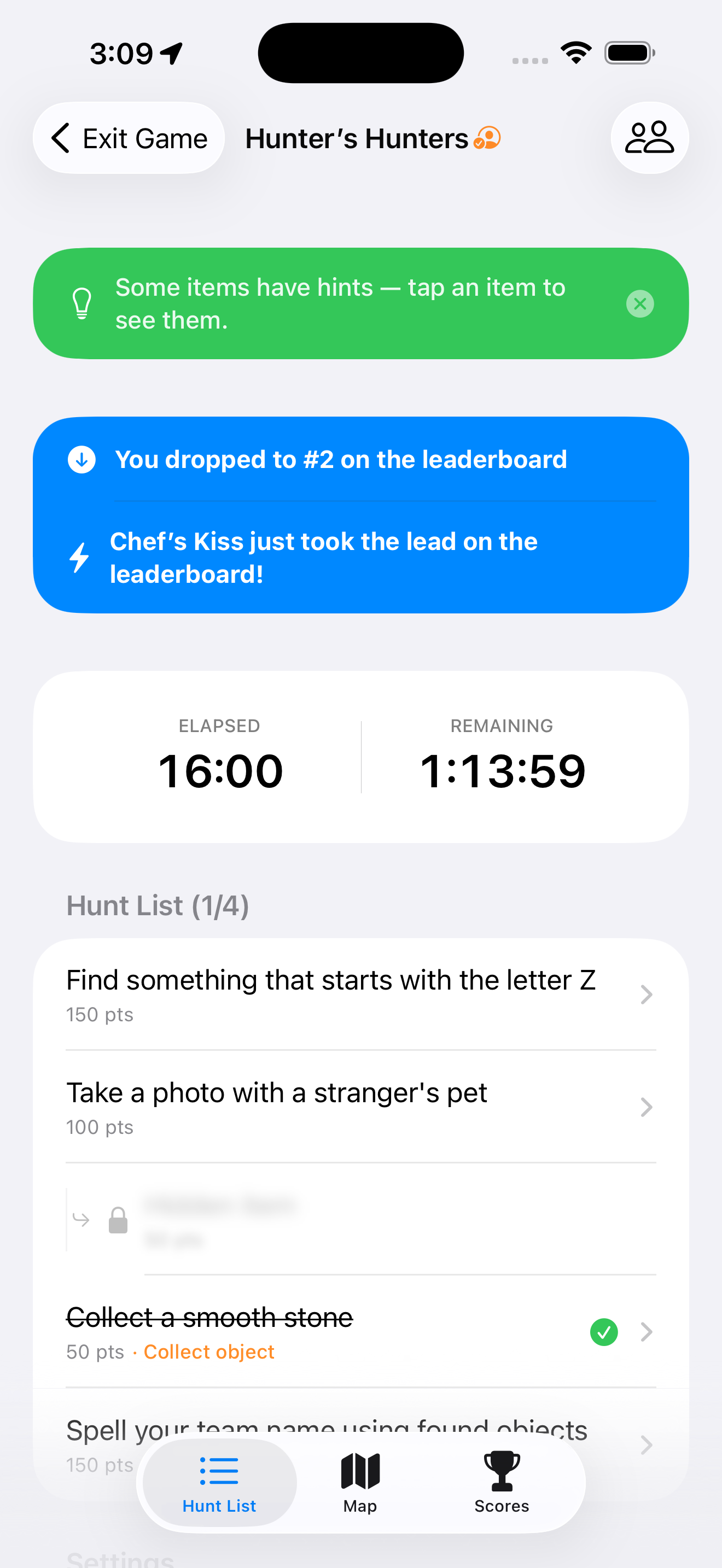
Secret items that appear after completing a trigger. Blurred teasers hint at what's waiting.
Randomized Order
Each team sees items in a different order, keeping groups spread out.
Game Tips
Players see relevant tips when the game starts — how hints work, what exclusive items mean, and more.
Live News Feed
Real-time updates for players: rank changes, bonus alerts, exclusive claims, timer warnings, and more. Auto-dismissing and toggleable.
Home Base Return
When the game ends or all items are found, a directional arrow guides players back. Hosts set home base to their current location or pick a custom spot on the map.
Bonus Time
The host can extend the clock mid-game. Players see a Bonus Time alert and an indicator on the timer.
What does the host see during a game?
A live dashboard with the leaderboard, team positions on a map, photo submissions arriving in real time, and safety check-in status. Hosts review and score submissions, broadcast announcements, message individual teams, and add bonus time without pausing play.
Evidence Review
Accept, reject, or adjust points on submissions. Rejected items can be resubmitted.
Live Leaderboard & Map
Real-time scores and team positions with photo locations on the map.
Live Announcements
Broadcast to all teams or message individual teams mid-game.
Safety Check-ins
Configurable check-in intervals prompt teams to confirm they're OK. The host dashboard shows who's overdue.
QR Code Sharing
Share the join code as a PNG image, printable PDF, or full-screen display.
Extend Time
Add extra minutes to a running game. Players are notified with a Bonus Time alert.
Slideshow & Sharing
Full-screen photo slideshow via AirPlay. Share photos and videos from the app.
Hunt Library
Start with a prebuilt library of ready-to-use scavenger hunt items, or save your own as reusable templates. Duplicate entire hunts for new events.
Offline Mode
Submissions queued offline and synced when connectivity returns.
11 Languages
Fully localized in English, French, German, Japanese, Spanish, Italian, Dutch, Swedish, Norwegian, Portuguese, and Korean.
Frequently asked questions
Do players need to pay?
No. Joining and playing games is completely free. Everyone can host for free with one player device to test their hunts. Paid plans start at $29.99 for larger groups.
Does it work without internet?
Yes. Submissions are queued offline and automatically synced when connectivity returns.
How many teams can play?
There's no hard limit. Teams join by scanning a QR code or entering a join code, and each team can have multiple members on separate phones.
Can I reuse hunts?
Yes. Duplicate entire hunts for new events, or save individual items to a reusable library. The app also comes with a prebuilt library of items to get you started.
Is there a subscription?
No. All host plans are one-time purchases starting at $29.99. No subscriptions, no ads.

.svg)